
Configuring a Network Operating System
| IOS Bootcamp | |
 | |
| Sell | The user interface that allows users to request specific tasks from the computer |
| Kernel | Communicates between the hardware and software of a computer and manages how hardware are used |
| Hardware | The physical parts of the computer including |
| PURPOSE OF THE OPERATING SYSTEM | |
| End Devices | Intermediary Devices |
| Use of a mouse | Configure interfaces |
| View output | Enable routing and switching functions |
| Enter Text | |
| All networking devices come with a default IOS | |
| Possible to upgrade IOS version or feature set | |
| In this course, the primary focus is on Cisco IOS Release 15.x | |
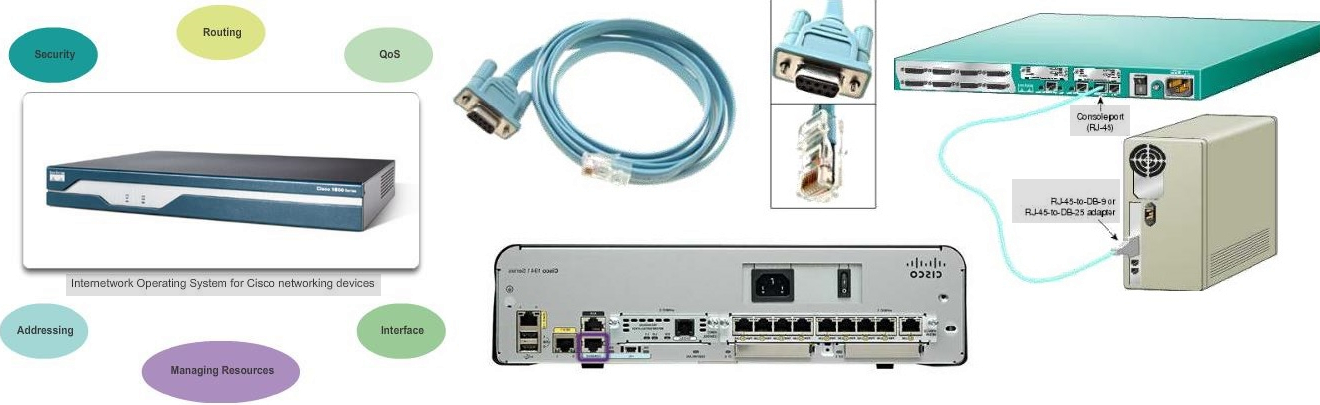
| Cisco INTERNETWORK OPERATING SYSTEM | |||||
| Network infrastructure software used around the world integrate technology, business-critical services, and hardware support | |||||
| SOFTWARE VARIATIONS | PROPERTIES | FUNCTIONS | |||
| Cisco IOS XE | Enterprise | Unix like Operating System | Security | ||
| optimal for facilitating enterprise and service provider services | Typically stored in Flash | Routing | |||
| Cisco IOS XR | Service Provider | copied from flash to volatile RAM | QoS | ||
| Self-healing, self-defending, always-on OS provides service providers a foundation for network and service convergence scaling up to 92Tbps | Can be used to store multiple versions of IOS | Managing Resources | |||
| Cisco NX-OS | Nexus - Cloud | Image in compressed format (*.bin) | Addressing | ||
| This full-featured, modular, and scalable OS offers high availability, simplified operations, and exceptional flexibility | Can be inserted like SDRAM or can be on-board | Interface | |||
Console Access Method
- Console
- Device is accessible even if no networking services have been configured (out-of-band)
- Need a special console cable
- Allows configuration commands to be entered
- Should be configured with passwords to prevent unauthorized access
- Device should be located in a secure room so console port cannot be easily accessed
- Telnet
- Method for remotely accessing the CLI over a network
- Require active networking services and one active interface that is configured
- Secure Shell (SSH)
- Remote login similar to Telnet, but utilizes more security
- Stronger password authentication
- Uses encryption when transporting data
- AUX
- Out-of-band connection
- Uses telephone line
- an be used like console port
Cisco IOS Modes of Operation
- USER EXEC COMMANDS - Router>
- ping
- test end-to-end connectivity
- show
- (Limited) view details on the subsequent parameter
- enable
- switch to Privileged Exec mode in the IOS model hierarchy
- etc...
- PRIVILEGED EXEC COMMANDS - Router#
- includes all User Exec commands
- debug
- command used as debugging tool
- reload
- reset system configuration to that of startup file
- configure
- transcend to the next particular mode in the IOS model hierarchy
- etc...
- GLOBAL CONFIGURATION COMMANDS - Router(config)#
- hostname
- rename host
- enable secret
- protect Privileged Exec with encrypted password
- ip route
- ???
- interface ethernet
- interface serial
- interface dal
- interface ...
- transcend to interface configuration mode of the specified interface in parameter
- Interface Commands - Router(config-if)#
- ip address
- assign 32-bit decimal address to interface
- ipv6 address
- assign 128-bit hexa-decimal address to interface
- shutdown/no shutdown
- activate/deactivate interface
- etc...
- router rip
- router ospf
- router eigrp
- router ...
- transcend to router configuration mode of the specified router in parameter
- Routing Engine Commands - Router(config-router)#
- network
- ???
- version
- ???
- auto summury
- ???
- etc...
- line vty
- line console
- line ...
- transcend to line configuration mode of the specified line in parameter
- Line Commands - Router(config-line)#
- password
- secure line with password
- login
- ???
- modem commands
- ???
- etc...
| HOT KEYS AND SHORTCUTS | |
| Tab | Completes the remainder of a partially typed command or keyword |
| Ctrl-R | Redisplays a line |
| Ctrl-A | Moves to the beginning of the line |
| Ctrl-Z | Exits the configuration mode and returns to user EXEC |
| Down Arrow | Allows the user to scroll forward through former commands |
| Up Arrow | Allows the user to scroll backward through former commands |
| Ctrl-Shift-6 | Allows the user to interrupt an IOS process such as ping or traceroute |
| Ctrl-C | Exits the current configuration or aborts the current command |
GETTING BASIC
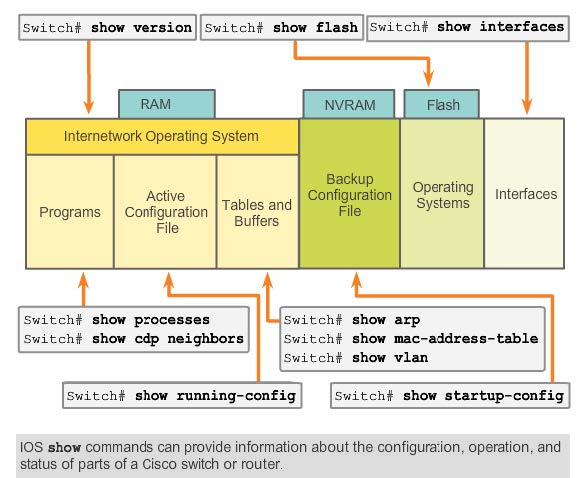 |
| IOS Examination Commands |
| SECURING DEVICE ACCESS | ||
| IOS MODE | COMMAND | DESCRIPTION |
| (config)# | enable password | Limits access to the privileged EXEC mode |
| (config)# | enable secret | Encrypted, limits access to the privileged EXEC mode |
| (config-line)# | console password | Limits device access using the console connection |
| (config-line)# | vty password | Limits device access over Telnet |
| (config)# | service password-encryption | Prevents passwords from viewing as plain text when viewing the config |
| (config)# | banner motd #String# | This configuration results in the message of the day banner |
ADDRESSING SCHEMES
| IP ADDRESSING OF DEVICES | |||
| together with subnet mask, uniquely identify end devices on internetwork | |||
| SUBNET MASK | Determines which part of a larger network is used by an IP address | ||
| Each end device on a network must be configured with an IP address | |||
| Structure of an IPv4 address is called dotted decimal | |||
| IP address displayed in decimal notation, with four decimal numbers between 0 and 255 | |||
| With the IP address, a subnet mask is also necessary | |||
| IP addresses can be assigned to both physical ports and virtual interfaces | |||
| IOS MODE | COMMAND | DESCRIPTION | |
| (config)# | interface VLAN 1 | Selects interface vlan 1 | |
| (config-if)# | ip address 192.168.10.2 255.255.255.0 | assigns device IP address and subnet mask | |
| (config-if)# | no shutdown | Administratively enables the interface | |
| Switch still needs to have physical ports configured and VTY lines to enable remote management | |||
| INTERFACES AND PORTS |
| Network communications depend on end user device interfaces, networking device interfaces, and the cables that connect them |
| Different types of network media have different features and benefits |
| Ethernet is the most common local area network (LAN) technology |
| Ethernet ports are found on end user devices, switch devices, and other networking devices |
| Cisco IOS switches have physical ports for devices to connect to, but also have one or more switch virtual interfaces |
| SVIs; no physical hardware on the device associated with it; created in software |
| SVI provides a means to remotely manage a switch over a network |